Getting Started / Overview
Getting Started
Fantom Set List Buddy is an iOS and Android companion for Roland® Fantom® workstation users. Edit your set lists on iPhone, iPad, Mac (Apple silicon), or Android — then restore them onto the Fantom.
This handbook matches the in-app Help. Use Contents to jump to any chapter. Use Previous and Next at the bottom of each page to follow the suggested reading order.
The screenshots throughout this document show the iOS look and user experience. All features are the same on Android, but the user interface (UI) layout follows that platform’s patterns.
Fantom Set List Buddy is for anyone who uses a Roland® Fantom® synthesizer workstation (Fantom 6 / 7 / 8 including EX, or Fantom 06 / 07 / 08). We simply call the hardware the Fantom throughout this handbook.
You edit set lists (called Scene Chains on the Fantom) offline: back up to a USB stick, import into the app, change the running orders, export a new folder, then Restore on the Fantom and power-cycle.
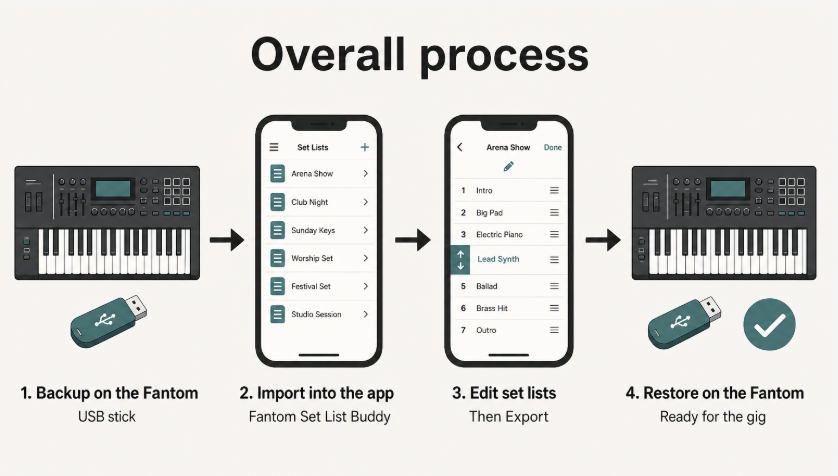
The Loop
- Backup on the Fantom — MENU → UTILITY → BACKUP. Turn INCLUDE PAD SAMPLE and INCLUDE KBD SAMPLE off for the fastest copy when you only need set lists.
- Import the backup into the app from USB Stick or a folder.
- Edit set lists, markers, and cues.
- Export a new Restore folder to USB Stick or Files.
- RESTORE on the Fantom, then power-cycle.
Scene names, tones, and keyboard splits stay as they were in the backup. This app is for set list management, not a full Fantom editor. Change scenes on the Fantom, then take a new backup if you want the app to see those updates.
You work with one open backup at a time. Edits are saved by Fantom Set List Buddy as you go, but you need to use the Export functions in the USB Stick screen to store them back to where you can restore it from on your Fantom. Use  Undo if you want to step back through this session.
Start here the first time you use the Fantom Set List Buddy.