Overview / Frequently Asked Questions
Frequently Asked Questions
Frequently asked questions we have heard from our users.
Why do I see Terms of Use when I first open the app?
The first time you start the app after installing it (and again when the Terms are updated), Terms of Use appear after the splash. Scroll to the end, then tap Agree to continue, or Close App if you do not accept. You can re-read them anytime under  Settings → About → Terms of Use (read-only; you do not have to Agree again).
Does the app overwrite my imported backup?
No. The backup you imported is not edited in place. Set list changes stay separate until you export, and export always creates a new folder.
Why don’t sheets close when I drag them down?
Sheets and dialogs close only with Cancel, Back, or Close. Dragging a sheet down does not dismiss it, so scrolling a long list will not close the sheet by accident.
Why can’t I find an action in the context menu?
The context menu is a long list of functions, so ensure you scroll down to see every available action. On devices with smaller screen sizes, fewer items fit on screen at once — that is often why someone does not see an action they expect (for example swaps or markers further down the list). Tap  More on a set list, song, or scene — or press and hold the row — to open the menu, then scroll.
Set list, editor, and Scenes screens each have their own context menu. See Set Lists Context Menu and Edit a Set List Context Menu for walkthroughs.
What if the Fantom has newer scene edits than my backup?
Take a fresh backup on the Fantom immediately before you restore, under another name if you want to keep the older folder.
Should I include pad and keyboard samples in everyday backups?
Prefer set-list-sized backups with samples off for everyday editing speed. Scene names and set lists are the same either way; turn samples on when you need them for Restore. See Backup on the Fantom.
Should I turn off pad and keyboard samples on Restore?
Yes — for set-list work, turn off APPLY PAD SAMPLE and APPLY KBD SAMPLE on the Fantom Restore screen unless the export folder actually includes those samples. Exports from this app usually omit them; leaving both off is fastest and safest. See Export and Restore.
How much free space do I need?
Keep free space on the phone and USB stick for import and export copies. See System Requirements for sizes.
Why is Import or Export so slow on iPhone with my USB stick?
Older or worn USB sticks can make read and write crawl on iPhone — especially Export, which writes hundreds of small files (sequences and the rest of a full backup). Progress may sit on a name such as SeqSet.SQS for minutes while it is still working. Import can feel fine on the same stick, because reading is cheaper than that many small writes. Prefer a newer Fantom-formatted USB stick (still 32 GB or smaller); the same export that crawled on a 2016-era stick usually finishes in a much more reasonable time on a modern one. See the stick recommendation below.
Which USB stick works well with iPhone?
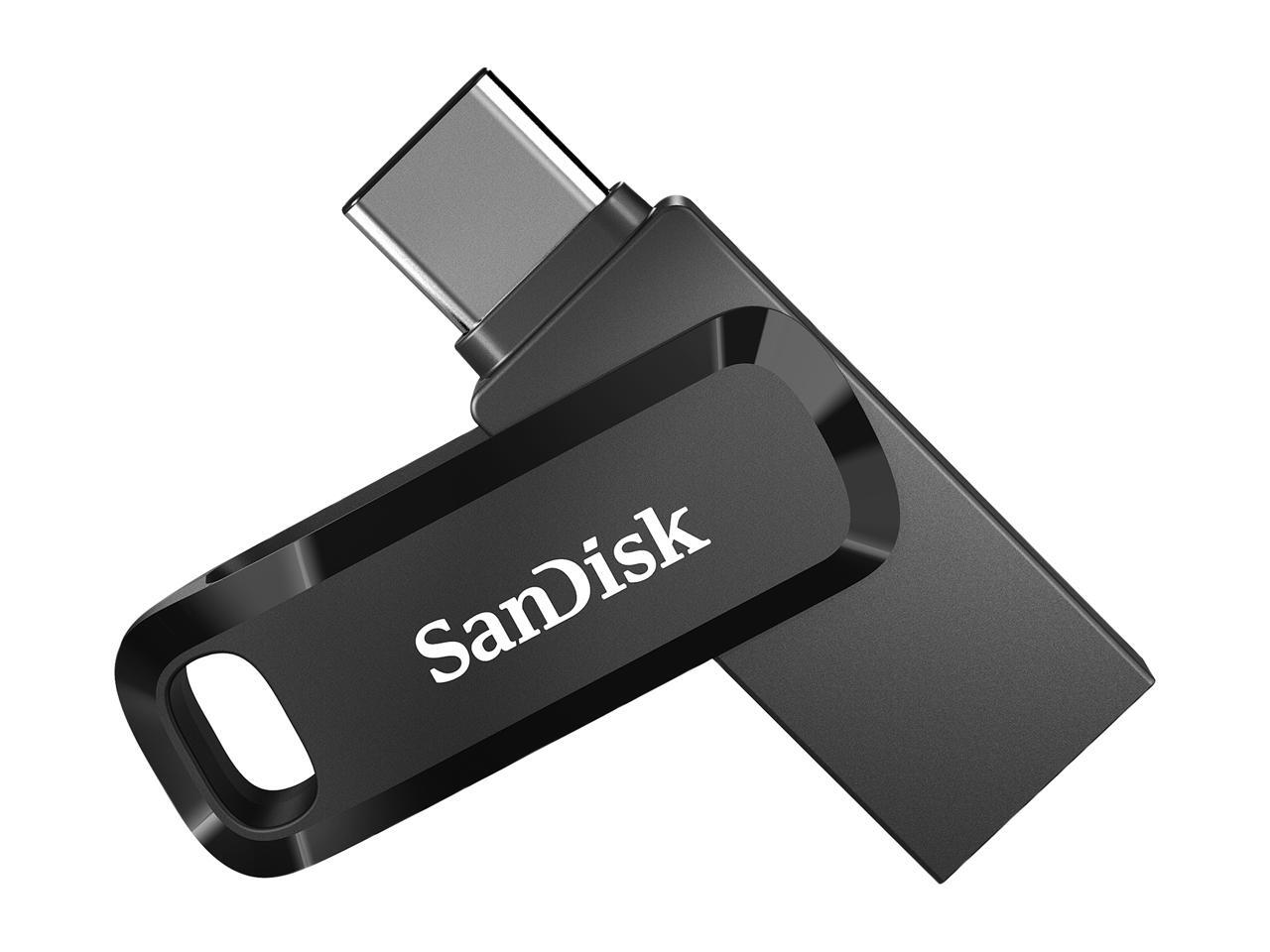
Choose a stick that has both USB-C and USB-A in the same device: USB-C for iPhone / iPad (and many Android phones), USB-A for the Fantom USB MEMORY port — still 32 GB or smaller, then format on the Fantom (UTILITY → USB MEMORY FORMAT).
In our testing, a SanDisk Ultra Dual Drive Go 32 GB (USB Type-C) worked well on iOS devices with a USB-C port.
How do I format a USB stick for the Fantom?
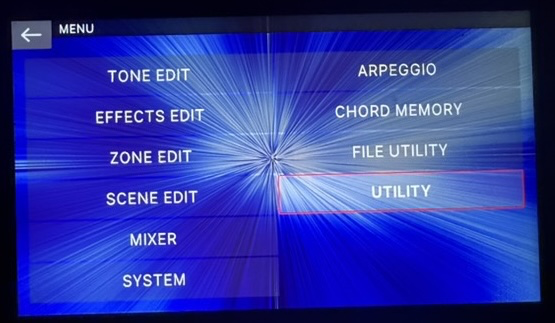
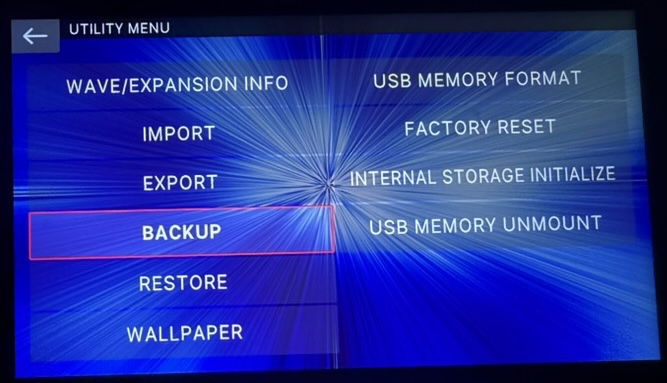
On the Fantom, open MENU → UTILITY → USB MEMORY FORMAT. That creates an empty FAT 32 USB stick that the Fantom can use for Backup and Restore. After format, the stick’s volume name is usually FANTOM (that is the stick label — not the middle folder of /ROLAND/FANTOM/BACKUP). Formatting erases everything on the stick.
How do I safely eject the USB stick on a Mac?
After Export to Fantom USB Stick… finishes, the Saved dialog offers Show in Files. On a Mac running the iPad app, that opens the export folder in Finder. In the Finder sidebar, find the stick (often labeled FANTOM after a Fantom format) and click the eject icon before you unplug it — same as ejecting any external drive.

Why does the Fantom say “USB Memory Not Ready”?
If the Fantom shows USB Memory Not Ready (its on-screen wording for a stick it cannot use), the stick is often corrupted, or someone copied files by hand into /ROLAND/FANTOM/BACKUP (or a folder under it) in a way the Fantom does not expect. Prefer letting the Fantom create backups with UTILITY → BACKUP, and let this app Export to USB Stick… write Restore folders. If the stick stays unusable, format it again on the Fantom with UTILITY → USB MEMORY FORMAT (that erases the stick), then take a fresh backup.
Can I save Bands or Songs files on the Fantom USB stick?
Save and load Bands (and Songs) to a folder on your device or the cloud — not inside /ROLAND/FANTOM/BACKUP or its subfolders. Your Fantom will not like extra files in that tree and may flag your USB stick as unavailable.
What does Roland mean by “song”?
Roland uses song in more than one way on the Fantom. That is different from the Songs tab in Fantom Set List Buddy (see Songs), which lives on your device only and is not stored in the backup.
1. Scene Chain (what this app edits). A gig set list is scenes in order inside a Chain Set. There is no Song object — only scene slots. If one tune uses three scenes, the Fantom stores three separate chain entries, not one grouped “song.”
2. Built-in sequencer Song (a different feature). Each scene can hold sequencer data: Pattern → Group → Song. That Song lives inside that scene’s sequence data (likely in FANTOM.SVD; this app does not edit it). It is for Intro / Verse / Chorus playback, not for Scene Chain set lists or the app’s Songs tab.
How do I get better Share and text-import results?
Name the first scene of each song after the song. That helps Share and Import from text match what your band leader writes. Match also strips trailing run times and - Artist credits, and keeps Set 1 / Encore lines as set markers.
Can I Share a set list text into the app from Mail?
On iOS, yes: Share plain text or a .txt / .csv and choose Import into Fantom Set List Buddy. That opens New Set List from Text so you can Match…, review, and Create. PDF or photos are not imported that way yet.
What should I check after Restore?
Spot-check a few set lists on the Fantom after Restore and a power-cycle.
What should I include when I report a bug?
Always include the version and build from Settings → About (at the bottom of Settings). That tells us exactly which app build you are running.